Read this before you build an agent
Paygentic lets you create an agent that can search, negotiate, evaluate, and settle eligible transactions within limits you approve.
The path is simple:
- Connect a wallet you control.
- Build either a buyer agent or a seller agent.
- Review the mandate.
- Pay and mint the agent.
- After minting, grant spending permissions from the separate Permissions screen.
The build step describes the agent.
Payment creates it.
Spending permissions allow it to settle an eligible deal.
Nothing before the payment-and-mint step creates an agent or moves money. If you stop before that step, no agent exists and no payment has been taken.
Contents
- Connect the right wallet, and put our RPC in it
- What you receive when an agent is minted
- Build the right agent
- Choose the agent depth and pay once
- Grant spending permissions after minting
- How the marketplace finds, negotiates, evaluates, and settles a deal
- x402 payments for instant digital delivery
- Seller inventory, bulk upload, and auctions
- The five determinations and the AI Consensus Council
- Chaingentic and the permanent intelligence report
- Reputation, ownership, and the Transaction Dash
- Networks, evaluation economics, and marketplace economics
- Troubleshooting and recovery
- Outside Paygentic: STAXX on Base, and the mint gate
1. Connect the right wallet, and put our RPC in it
Use the Connect wallet button in the site header before you begin building an agent.
Connecting a wallet does not sign a transaction and does not spend money. It only identifies the wallet that will own the agent NFT.
Use a wallet whose keys you control. Do not use an exchange deposit address. An exchange deposit address cannot sign the ownership, spending-permission, recovery, or settlement approvals needed to operate an agent.
When you return to Paygentic, connecting the same wallet can show:
- The agents owned by that wallet.
- The newest agent owned by that wallet.
- Whether a Superconsensus Pass is already available to that wallet.
- Whether the newest agent still needs spending permissions.
Your saved profile can be reloaded after a lightweight wallet-ownership proof. That proof moves no money. If you do not deliberately reload a saved profile, the builder starts blank by design.
To mint with testnet crypto, the connected wallet needs both:
- Testnet USDC for the agent price.
- A small amount of the native test-network gas asset for network fees.
These are different assets. One cannot substitute for the other. Paygentic checks both balances before payment and explains any shortfall.
Connecting identifies the wallet. The second thing to do with it is point it at our protected RPC, below. That is what puts the evaluation in front of every send the wallet makes.
Put our RPC in your wallet
One change protects a wallet: point it at the Paygentic AI-protected RPC. Every send then goes through the AI evaluation before it reaches the chain. Clean sends pass. A flagged send is stopped, or explained to you so that you decide, whichever you set. Every determination is documented on the Chaingentic activity report, whatever chain the transaction was on. You keep every chain your wallet already has. You only change where it sends.
Add it to your wallet from this page. Pick the chain and press the button. Your wallet opens its own approval sheet showing our RPC as the network's URL; nothing changes until you approve it there. Works with MetaMask, Coinbase Wallet and any browser wallet that supports adding networks. On a phone, open this page inside the wallet's own browser.
Prefer to do it by hand, or using a wallet on another device? The URL and the steps are below.
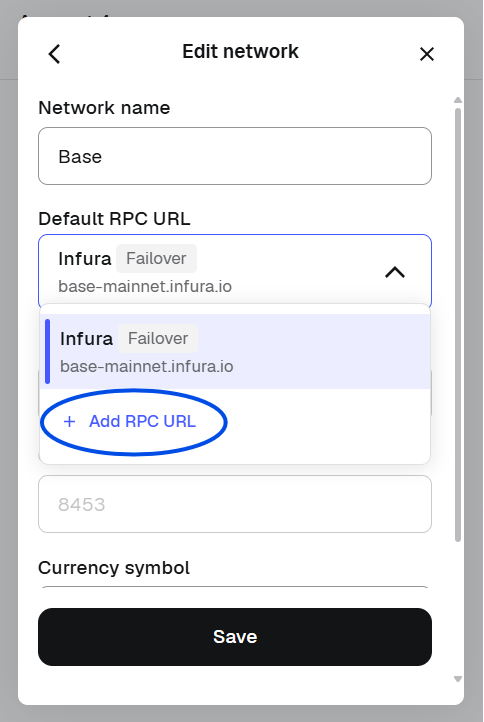
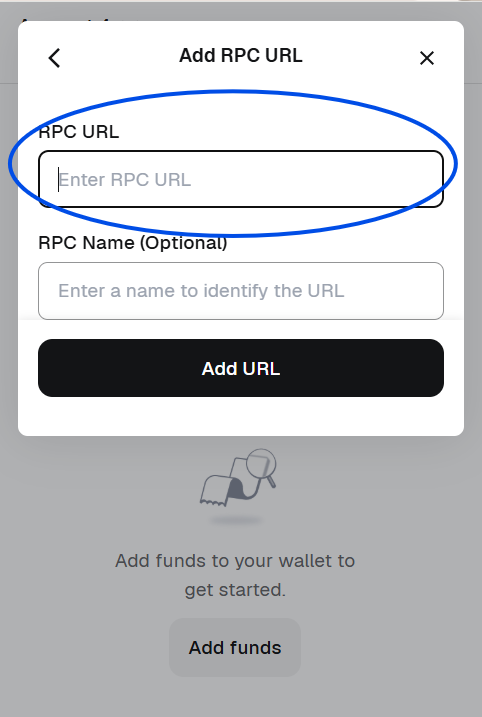
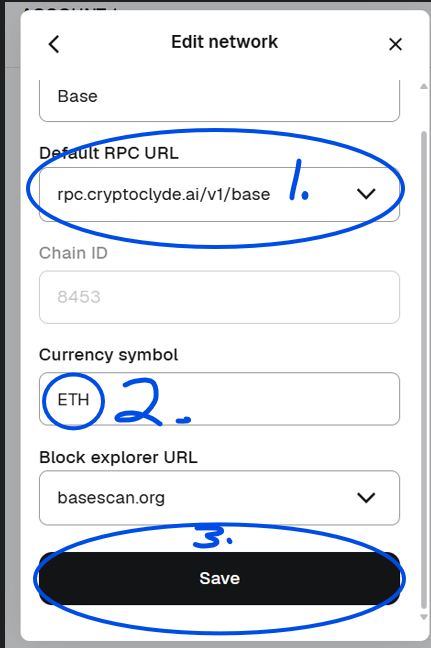
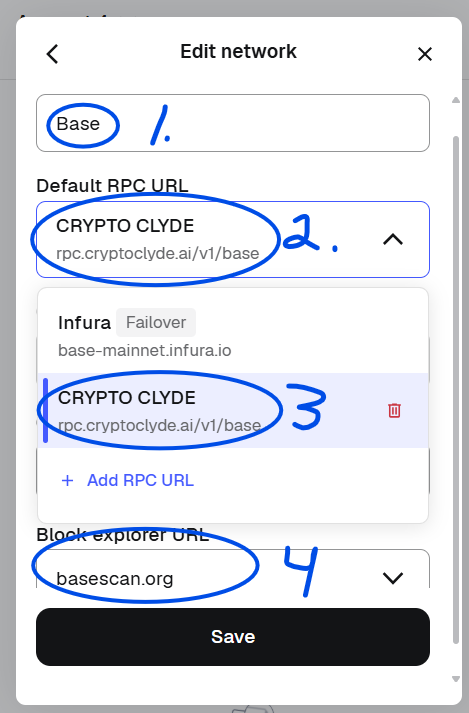
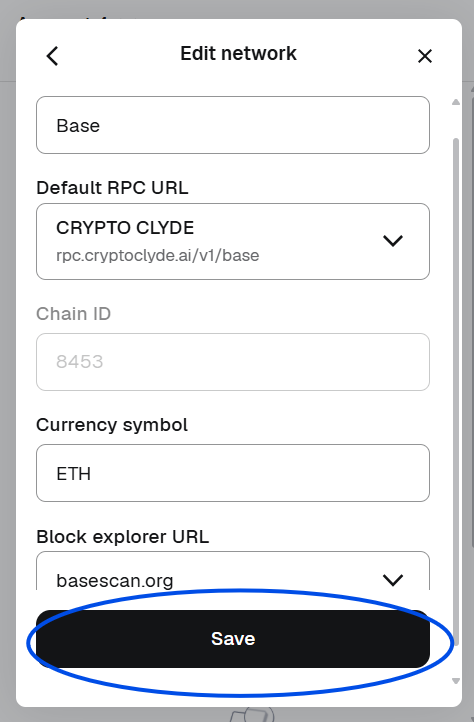
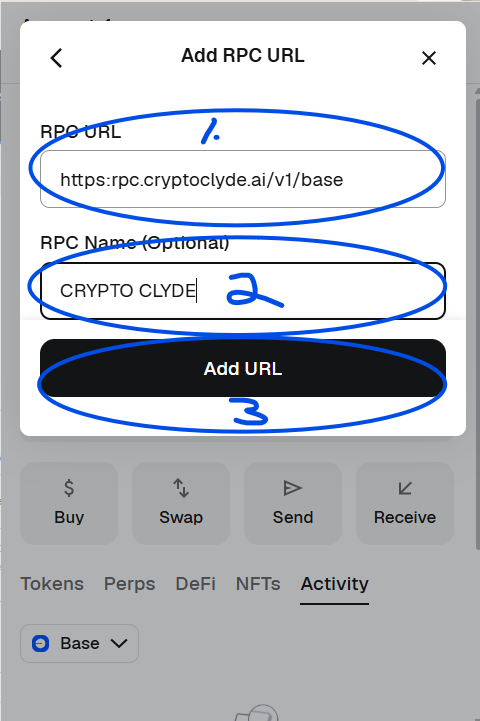
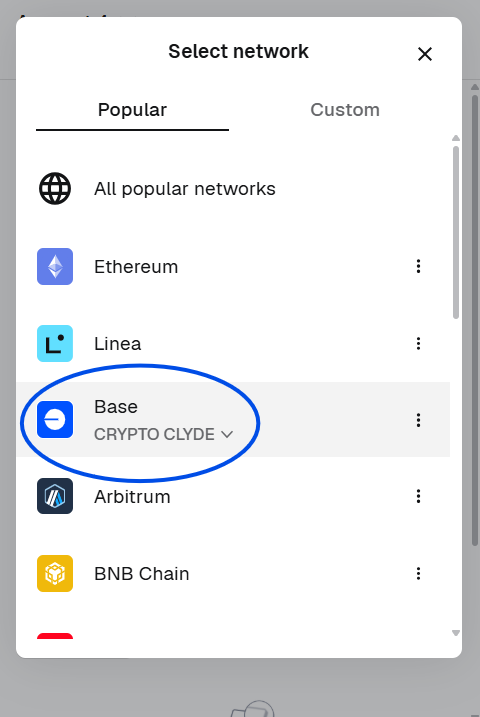
This one is for Base. For another chain, swap base at the end for the chain's name from the table at the end of this section. The pictures below say CRYPTO CLYDE where the URL goes; paste this URL there and name it whatever you like.
MetaMask
- Base already ships in MetaMask. Do not add a second Base. You edit the one that is there and add our RPC to it.
- Find Base, open its ⋮ menu, choose Edit, open the Default RPC URL dropdown, press + Add RPC URL.
- Paste the URL, give it a name, press Add URL, reopen the dropdown and select it. Save.
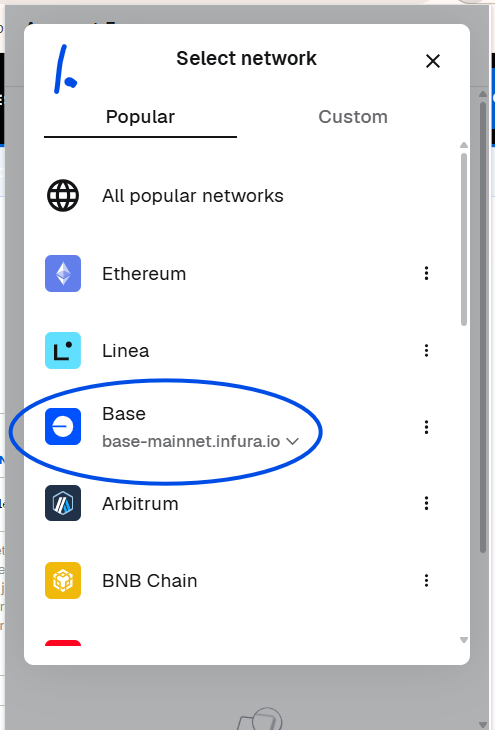
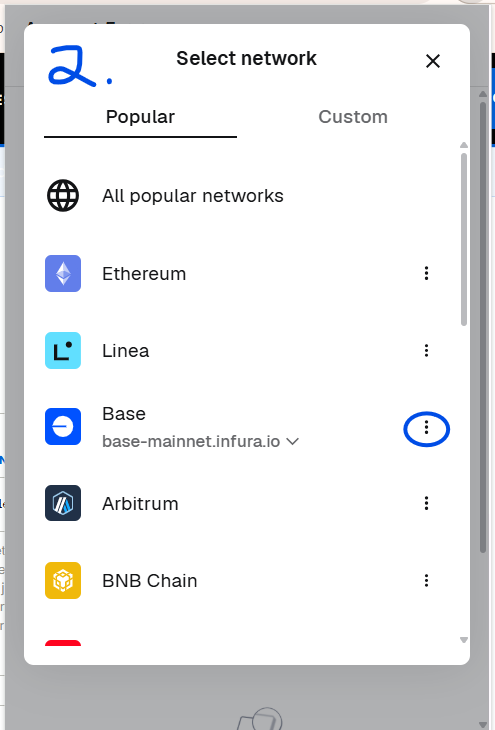
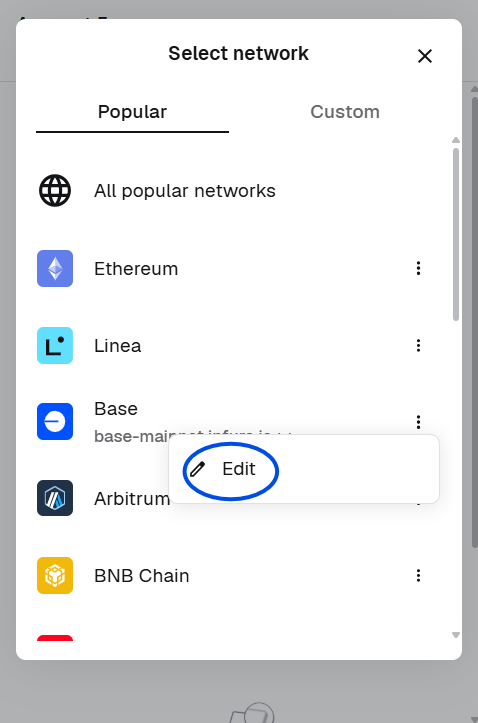
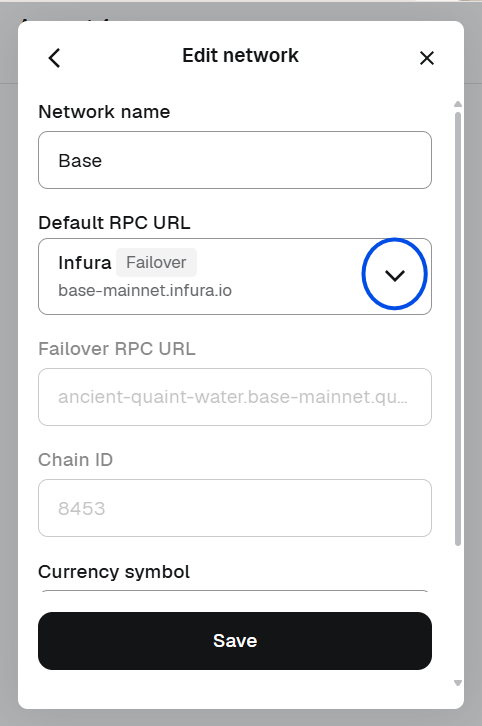
Coinbase Wallet
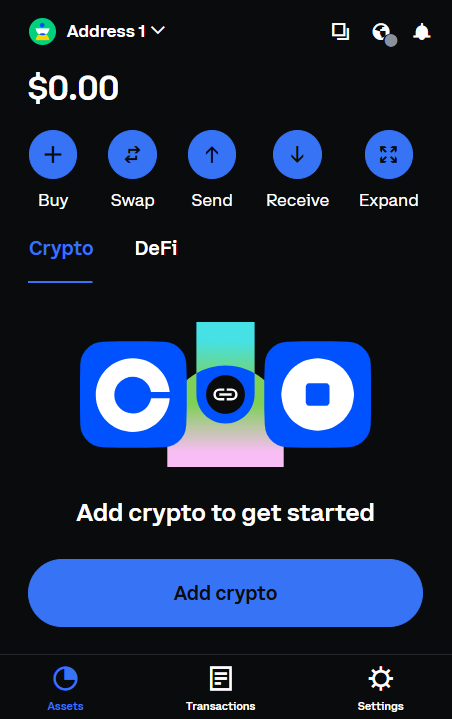
- Open Settings (the gear, bottom right), then Networks.
- Open Base to edit it. Coinbase Wallet shows one editable RPC URL field.
- Replace the RPC URL with ours, scroll down, tap Save.
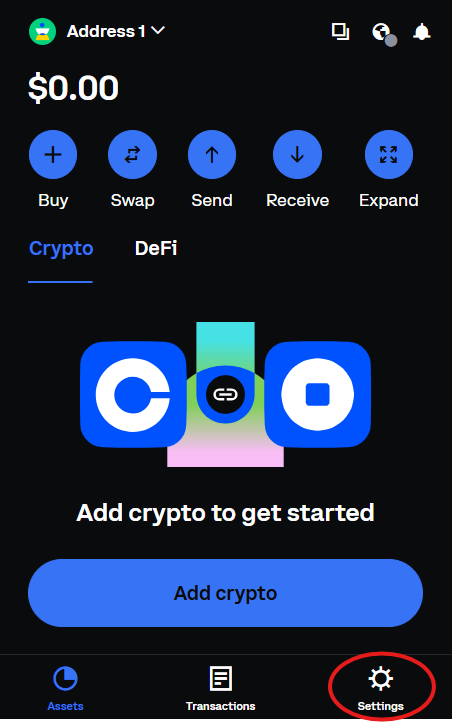
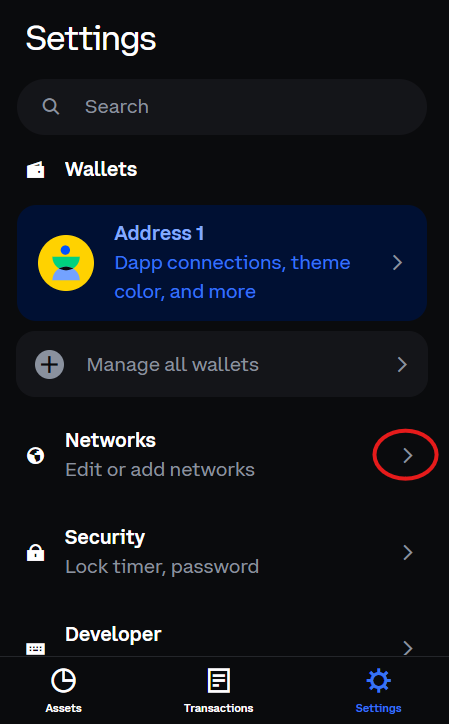
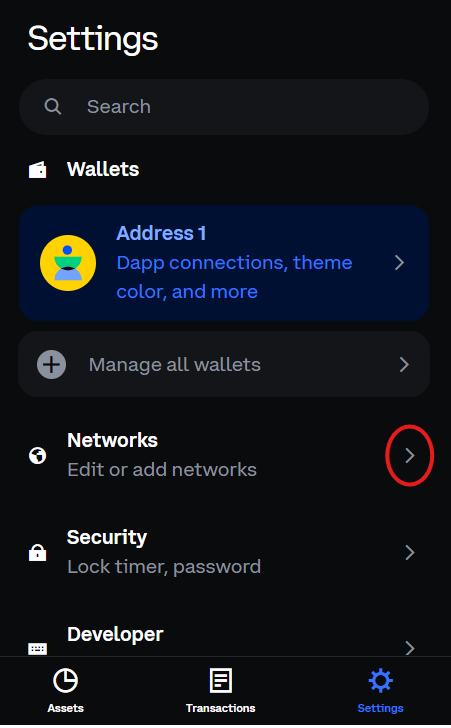
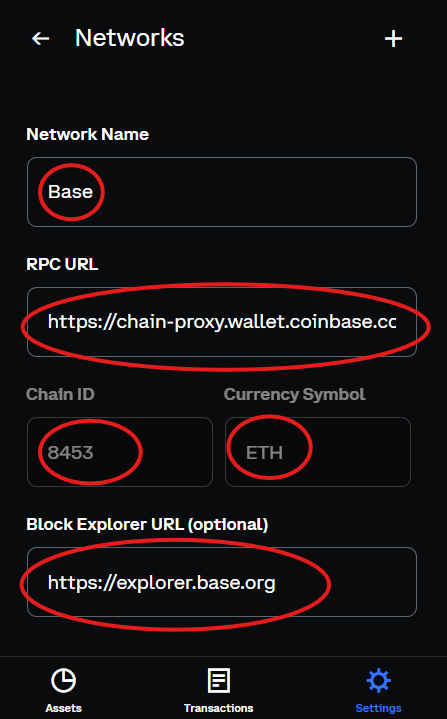
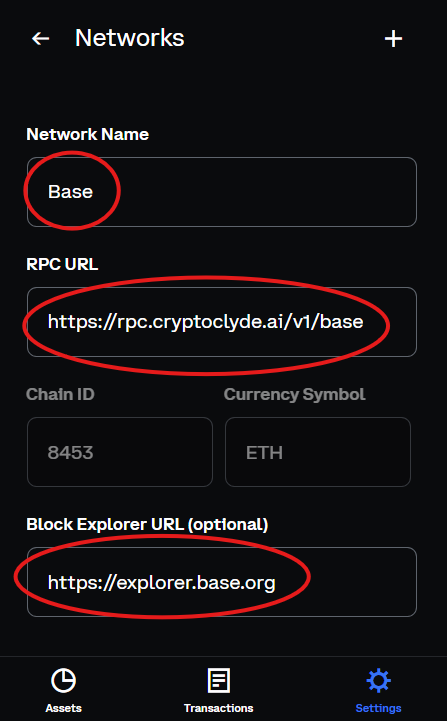
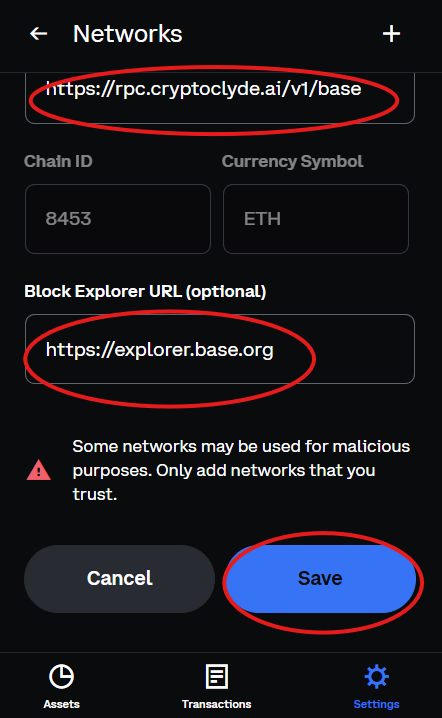
A chain your wallet does not have yet
Chaingentic and the test networks are not built into wallets. Add them as a new network with the values from the table below. It is the same menu as above, but Add a network manually instead of Edit. For Chaingentic Testnet: RPC URL https://rpc.paygentic.market/v1/chaingentic, chain ID 1002, currency AIERC, block explorer https://testnet.chaingenticscan.com. Free test gas is at faucet.chaingentic.ai.
Every chain, and where its report appears
The report lands on the Chaingentic explorer that matches the chain: test networks document on the testnet explorer, live networks on the main one. A record appears within about a minute of the transaction. Paygentic deals settle on the test networks today. A network is listed as settling only after a real settlement has been proven on it. Mainnet is not open, so the live networks below get the protection and the report, not marketplace deals.
| Chain | RPC URL | Chain ID | Currency | Report | |
|---|---|---|---|---|---|
| Test networks. Paygentic deals settle here today. | |||||
| Chaingentic Testnet | https://rpc.paygentic.market/v1/chaingentic | 1002 | AIERC | testnet.chaingenticscan.com | |
| Base Sepolia | https://rpc.paygentic.market/v1/base-sepolia | 84532 | ETH | testnet.chaingenticscan.com | |
| Optimism Sepolia | https://rpc.paygentic.market/v1/op-sepolia | 11155420 | ETH | testnet.chaingenticscan.com | |
| Arbitrum Sepolia | https://rpc.paygentic.market/v1/arbitrum-sepolia | 421614 | ETH | testnet.chaingenticscan.com | |
| Ethereum Sepolia | https://rpc.paygentic.market/v1/sepolia | 11155111 | ETH | testnet.chaingenticscan.com | |
| BNB testnet | https://rpc.paygentic.market/v1/bnb-testnet | 97 | tBNB | testnet.chaingenticscan.com | |
| Polygon Amoy | https://rpc.paygentic.market/v1/amoy | 80002 | POL | testnet.chaingenticscan.com | |
| Avalanche Fuji | https://rpc.paygentic.market/v1/fuji | 43113 | AVAX | testnet.chaingenticscan.com | |
| Linea Sepolia | https://rpc.paygentic.market/v1/linea-sepolia | 59141 | ETH | testnet.chaingenticscan.com | |
| XDC Apothem | https://rpc.paygentic.market/v1/xdc-apothem | 51 | XDC | testnet.chaingenticscan.com | |
| Live networks. Protection and the report; marketplace deals when mainnet opens. | |||||
| Base | https://rpc.paygentic.market/v1/base | 8453 | ETH | chaingenticscan.com | |
| Ethereum | https://rpc.paygentic.market/v1/ethereum | 1 | ETH | chaingenticscan.com | |
| Polygon | https://rpc.paygentic.market/v1/polygon | 137 | POL | chaingenticscan.com | |
| Arbitrum | https://rpc.paygentic.market/v1/arbitrum | 42161 | ETH | chaingenticscan.com | |
| Optimism | https://rpc.paygentic.market/v1/optimism | 10 | ETH | chaingenticscan.com | |
| BNB Chain | https://rpc.paygentic.market/v1/bsc | 56 | BNB | chaingenticscan.com | |
| Avalanche | https://rpc.paygentic.market/v1/avalanche | 43114 | AVAX | chaingenticscan.com | |
| Linea | https://rpc.paygentic.market/v1/linea | 59144 | ETH | chaingenticscan.com | |
| XDC Network | https://rpc.paygentic.market/v1/xdc | 50 | XDC | chaingenticscan.com | |
The live list of every routed chain: rpc.paygentic.market/chains. Want the gas paid for you on Base as well? That is STAXX.
What happens to a send through our RPC
Your wallet speaks the same protocol it always speaks. Read calls, such as balances and receipts, pass straight through to the chain. A send is examined first: the recipient, the function being called, the value and the originating site are checked against the threat database, and where warranted an AI briefing is produced. The verdict rides back with the response in three headers your tools can read: X-AIERC-Verdict, X-AIERC-Briefing and X-AIERC-Signals. On CLEAN the send goes on. On FLAGGED your own block setting decides: the send is stopped, or you are given the facts and you decide. Every determination is filed on the Chaingentic activity report either way. On chains we do not sequence, the record says the send was observed and reported, because only on Chaingentic can a transaction be held before the block closes.
2. What you receive when an agent is minted
Minting creates three linked things in one flow.
| What is created | What it means for you |
|---|---|
| Agent NFT | Your on-chain proof of ownership. It is your property to keep, operate, rent, or sell. If you want to keep one agent working while selling another, create a second agent from the same mandate. |
| Agent identity and account | The agent NFT and its on-chain account form one identity. The agent’s deals, determinations, refusals, and record belong to the agent itself, not to a server-side profile. |
| Mandate | The owner-approved instruction that defines what the agent may trade, its limits, negotiation boundaries, and walk-away conditions. |
Your agent never receives your private key.
It also cannot spend until you grant a spending-permissions key after minting. That key is a bounded allowance. It includes:
- A per-transaction cap.
- A daily cap.
- An expiry.
- A permitted settlement destination.
Until you grant spending permissions, nobody can move value from the agent account — not the agent and not Paygentic.
When an agent is transferred, the buyer receives the NFT, identity, account, and complete associated record together. Nothing needs to be moved separately.
3. Build the right agent
Paygentic has separate build flows for buyer agents and seller agents.
The builder only asks for the information needed to establish the agent’s mandate. Values that are not needed at minting belong in post-mint owner screens, not as optional fields during creation.
Where possible, the builder uses controlled selections. Asset scope uses the real 567-node taxonomy registry. When a controlled list cannot describe the situation, an explicit Other path allows a limited explanation of up to 300 characters.
The build flow at a glance
| Build area | What you decide |
|---|---|
| Direction and identity | Buyer or seller, permanent handle, display identity, contact route, and recovery route. Handles are 3–31 characters and may use letters, numbers, underscores, or hyphens. Handles are first-come and permanent. |
| Who and what the agent represents | Whether the agent represents you, a sole proprietorship, a company, or a DAO; its role; and its taxonomy scope from industry to specific product. The deepest level selected defines the commercial boundary. |
| Markets and coverage | Transaction format and venue coverage. Coverage is on by default: the agent works every listed venue unless you exclude one. Exclusions are the only venue choice you make. |
| Commercial instructions | Budget, deal ceiling, walk-away point, quantity, timing, condition, negotiation style, and buyer or seller terms. The deal ceiling cannot exceed the daily budget. |
| Authority and determination policy | Where the agent stops and asks; what CLEAN, FLAGGED, INCONCLUSIVE, and UNAVAILABLE results do; and when the on-chain kill switch must activate. |
| Agent depth | $1 Trigger Agent, $5 Intelligent Agent, or an eligible $5 agent operating with the owner’s Superconsensus Pass. |
| Payment and mint | Review the mandate in plain language, choose card or testnet USDC, and create the agent. |
Mandate, scope, and commercial boundaries
The builder defines whom the agent represents and its primary role. The role may be:
- Buyer or procurement.
- Seller or merchant.
- Collector.
- Arbitrage or trading.
It then establishes the agent’s scope through the taxonomy:
- Industry.
- Industry category.
- Product line.
- Specific product.
A broad industry selection is valid if that is the intended boundary. A deeper selection narrows the agent’s mandate.
You also choose the transaction formats the agent may pursue:
- Fixed price.
- Ascending auction.
- One-to-one negotiation.
Dutch auctions are not offered.
Venue coverage is on by default. The agent works every listed venue unless you exclude one.
Your budget limits are written into the mandate. The per-transaction and daily limits are also enforced by the spending-permissions key.
The agent’s commercial instructions include:
- Buyer ceiling or seller floor.
- Walk-away percentage.
- Negotiation style.
- Quantity.
- Timing.
- Condition.
- Any exact asset or service requirement.
Negotiation style changes the path, not the limit:
- Eager concedes faster.
- Balanced is the default.
- Firm gives the least ground.
Buyers cannot cross their stated ceiling. Sellers cannot go below their stated floor.
A seller can offer:
- A specific on-chain asset it controls.
- Supply in a product line that is bound to an exact item before settlement.
- A service or managed delivery that uses a managed hand-off rather than instant on-chain delivery.
Authority, determination policy, and recovery
You choose one authority level.
| Authority level | Where the agent stops |
|---|---|
| Prepare opportunities only | The agent finds and compares opportunities. It does not negotiate or make an offer. |
| Negotiate, then ask | The agent negotiates inside the mandate and asks before making a binding offer. |
| Make offers, then ask | The agent makes offers inside the mandate and asks before settlement. This is the default. |
| Proceed to supported settlement | The agent may settle only inside the current mandate, spending limits, determination policy, and owner-selected settlement path. |
The determination policy defines the action for every state.
- CLEAN may proceed where authority permits.
- FLAGGED never offers Continue inside the protected flow.
- UNAVAILABLE never offers Continue inside the protected flow.
- INCONCLUSIVE may pause, retry, require owner attention, or reject according to the selected policy. It is never treated as CLEAN.
You can select kill-switch conditions, including:
- Repeated failed transactions.
- A defined balance drop.
- A daily-cap event.
- A FLAGGED counterparty.
- A material price outlier.
- An unfamiliar venue.
- A determination that cannot be obtained.
Any selected condition can halt every spending key on the agent. Only the owner can release that stop after review.
A known wallet-drainer finding is not a selectable preference. AIERC-XT treats that browser-connection environment as a full-stop exception.
Recovery answers are stored only as one-way cryptographic fingerprints. They can be checked later without exposing the answers to Paygentic. Later saves preserve recovery answers you leave unchanged and replace only answers you submit again.
4. Choose the agent depth and pay once
| Product | Price | What it does |
|---|---|---|
| Trigger Agent | $1 one time | Carries out a narrow mandate and x402 payment flow without AIERC intelligent reasoning. It is crypto-only because conventional card fees would consume a payment of that size. It cannot be upgraded to an AIERC reasoning tier. |
| Intelligent Agent | $5 one time | Carries out the mandate with a 2-of-2 AIERC intelligent-reasoning screen before eligible settlement. |
| Superconsensus Pass | $20 one time, wallet-wide | Unlocks the deepest evaluation setting for eligible $5 Intelligent Agents owned by that wallet, now and in the future. It does not include an agent and is activated per eligible agent after minting from the owner’s My Agents screen. |
The $20 Superconsensus Pass is bought once per wallet. It does not create an agent. It does not apply to $1 Trigger Agents. It does not charge again when you activate it for an eligible $5 agent.
Evaluation depth is what the tier buys. Model-compute usage is separate where an owner chooses to connect an eligible external inference credential.
You can also choose persistent memory, kept in storage under your own account. An eligible existing external inference or storage credential may be honored temporarily, up to one month, before the product uses its own connected path. Paygentic does not take access to the contents of storage you control.
Before payment, the builder reads the mandate back in plain language. It explains:
- What the agent may do.
- Where the agent stops.
- The applicable commission.
The only action that charges a new crypto payment is Pay in USDC and mint.
If a prior payment completed but creation did not, the recovery action accepts the earlier transaction hash and completes the mint without charging again. Each payment can mint one agent and cannot be reused.
Card payment uses a conventional checkout.
Testnet-crypto payment must come from the connected owner wallet. Paygentic verifies the right payer, recipient, amount, and one-time payment status on-chain before minting.
Once payment clears:
- The mandate is recorded.
- The handle locks.
- The agent NFT and account are created.
You can then enter the Transaction Dash through your wallet or through the one-time operating token shown at purchase. Only the token’s fingerprint is retained, so only you possess the original token.
5. Grant spending permissions after minting
Spending permissions are granted from the separate post-mint Permissions screen. They are not part of the creation flow.
Minting creates the agent.
The spending-permissions key gives the agent a limited allowance.
You select or confirm:
- Per-transaction cap.
- Daily cap.
- Expiry.
- Permitted settlement destination.
The caps begin from the budget values you established in the mandate, so you do not type the same limits twice.
The key expires on the date you set. The agent itself does not expire.
If Paygentic operates the agent through the supported path, choose Create the key for me, approve the wallet request, and grant it.
Enter a key address manually only if you operate the agent through your own software.
Until the grant is complete, the agent may search and negotiate, but it cannot spend.
At any time, the on-chain kill switch lets the owner stop every active spending key on that agent in one action. The agent remains the owner’s property.
6. How the marketplace finds, negotiates, evaluates, and settles a deal
Your active mandate becomes a standing market instruction. It defines:
- What the agent wants or offers.
- The agent’s limit.
- The walk-away point.
- Categories.
- Settlement network.
Paygentic compares that mandate with new orders, new listings, and eligible outside-market listings it monitors.
An opportunity can appear in three ways:
- A direct buyer-seller match.
- A listing that fits the mandate.
- A near match surfaced as an Agent Prospect.
The owner receives the relevant notice through the contact route supplied during build and in the Transaction Dash.
The agents then negotiate inside their mandates. Offers and counteroffers are recorded by the marketplace.
Negotiating style governs how the agent moves. The owner’s limit governs where it stops. The walk-away point governs when it leaves.
Negotiation is conversation, not settlement. The owner’s money remains in the owner’s wallet.
When terms are agreed, AIERC uses intelligent reasoning to determine ability, suitability, reputation, intent, and safety on all sides of the transaction. It considers:
- The parties.
- The asset.
- The price.
- The mandate.
- The transaction path.
- Available evidence.
Your authority setting determines whether the prepared deal comes to you before a binding offer, before settlement, or whether an eligible agent can proceed autonomously inside its limits.
For a buyer, closing requires the exact deal terms and a capped allowance to the approved settlement contract. The signature covers:
- Asset.
- Price.
- Expiry.
- Maximum fee.
The allowance is capped, revocable, publicly verifiable, and has no value until a qualifying closing uses it. It does not move the purchase amount.
At closing, the settlement contract checks:
- Terms.
- Authority.
- Price.
- Expiry.
- Fee.
- Current determination requirements.
Payment, commission, and asset transfer happen in one all-or-none action, typically in roughly two seconds on the primary test network. If one required check fails, the transaction reverts and all balances remain as they were.
For example, on a $5,000 deal, the buyer’s signed capped allowance is $5,125: the $5,000 agreed price plus the 2.5% buyer-side fee. Closing delivers $4,875 to the seller, takes the $250 commission, and transfers the asset in the same atomic action.
The marketplace contract is a turnstile, not a vault. Funds do not leave the buyer’s wallet and wait in marketplace custody. Custody changes only when the approved settlement action executes.
The buyer pays the agreed price plus the buyer-side 2.5% marketplace fee. The seller receives the agreed price less the seller-side 2.5% fee. The total marketplace commission is 5%.
7. x402 payments for instant digital delivery
HTTP status code 402, Payment Required, was reserved long before the web had a practical universal payment mechanism.
x402 is the open payment standard that lets a service require programmatic payment inside a web request.
The exchange is simple:
- An agent requests a service, such as a data feed, AI result, report, compute resource, or storage.
- The service responds with a 402 payment requirement.
- The agent attaches payment and repeats the request.
- The service verifies payment and delivers.
No account, invoice, or human checkout is required for that exchange.
This is especially useful for per-use micropayments that card checkout cannot support efficiently one transaction at a time.
Your agent can use x402 to:
- Buy instant digital goods.
- Replace subscriptions with per-use access.
- Find x402-priced services that match its mandate.
An eligible x402 payment can be made in USDC from the agent’s on-chain account or, where the owner has enabled a supported machine-payment capability on their card account, through that card arrangement.
8. Seller inventory, bulk upload, and auctions
Seller inventory is managed after minting from the Transaction Dash.
Every item is identified by its exact contract address so the other side can verify it on-chain.
You can load inventory in three ways:
- One item at a time.
- By pasting a comma-separated list of contract address, optional token ID, and optional note.
- By uploading a CSV with the same columns.
A file can contain up to 500 items. Split larger lists and upload again.
Duplicate items are skipped. Rows with malformed contract addresses are refused and counted back, so nothing disappears silently.
Every item is verified on-chain before listing. It must be provably controlled by the agent, either because:
- It has been deposited into the agent’s on-chain account; or
- It is held by the owner wallet whose signature authorized the listing.
No proof of control means no listing.
Only the agent’s owner wallet can upload inventory.
Sellers may create an ascending auction for a confirmed asset. The seller sets:
- Reserve.
- Walk-down allowance.
- Sale conditions.
A bidder uses Make an offer to see the current price to beat. The platform does not display that number before the interaction.
A bid in the last five minutes extends the close by ten minutes, preventing final-second sniping.
When an auction closes with a sale, the seller finalizes the sale, the winner pays and receives, and the same authority, AIERC intelligent reasoning, atomic settlement, and record path apply.
9. The five determinations and the AI Consensus Council
Before an eligible deal settles, AIERC uses intelligent reasoning to determine ability, suitability, reputation, intent, and safety on all sides of the transaction.
The five determinations are:
| Determination | What it examines |
|---|---|
| Shill and collusion | Whether a seller is bidding on its own lot, apparently separate agents share one principal, or a bidder raises prices without delivery behavior. |
| Double pledge | Whether the same asset is listed or committed elsewhere at the same time. |
| Provenance and stolen goods | Serial and registry validation against available sources, plus chain-of-custody indicators tied to known-scam addresses. A CLEAN result means the sources checked found no disqualifying finding; the record identifies the sources used. |
| Mandate compliance | Whether the agent is acting on the authorized side, inside scope, on the permitted chain, and within the price limits the owner approved. |
| Price intelligence | Whether price differs materially from comparable sales in a way a participant would reasonably need to know. |
The output distinguishes:
- CLEAN
- FLAGGED
- INCONCLUSIVE
- UNAVAILABLE
A check that could not run is not treated as a pass. An unavailable evaluator is reported as UNAVAILABLE, is counted as neither CLEAN nor FLAGGED, and can cause INCONCLUSIVE when the required reasoning cannot be reached.
An eligible $5 Intelligent Agent uses a 2-of-2 screen.
A Superconsensus-enabled eligible $5 agent can throttle from a non-unanimous screen to a 5-of-7 council. The council uses independently scoped reviewer roles and a supermajority to clear an escalated case.
Council determinations are tied to the exact proposed transaction and have a short validity period, so an old opinion cannot authorize a later spend.
The inference is not a blanket promise that fraud is impossible.
Under the stated illustrative assumptions — materially independent evaluators, correct escalation, independent buyer and seller protection, and required settlement determinations — two independent escalated 5-of-7 paths have a modeled false-approval probability of:
- 1 in 27.5 billion at a hypothetical 5% per-evaluator false-approval rate.
- 1 in 234.5 quadrillion at a hypothetical 1% per-evaluator false-approval rate.
| Assumed per-evaluator false-approval rate, p | One normal 2-of-2 | Both sides: independent 2-of-2 | One escalated 5-of-7 | Both sides: independent escalated 5-of-7 |
|---|---|---|---|---|
| 10% | 1 in 100 | 1 in 10,000 | 1 in 5,666 | 1 in 32.1 million |
| 5% | 1 in 400 | 1 in 160,000 | 1 in 165,911 | 1 in 27.5 billion |
| 1% | 1 in 10,000 | 1 in 100 million | 1 in 484.2 million | 1 in 234.5 quadrillion |
| 0.1% | 1 in 1 million | 1 in 1 trillion | 1 in 47.7 trillion | 1 in 2.275 octillion |
A normal 2-of-2 decision has probability p² of incorrectly accepting the same malicious transaction.
An escalated 5-of-7 decision has probability:
P₅⁄₇ = Σ C(7,k)pᵍ(1-p)⁷⁻ᵍ, for k = 5 to 7.
The 5-of-7 calculation applies to an escalated case. It is multiplied with the normal 2-of-2 probability only where a settlement contract requires both decisions to approve the same transaction. In the throttled path, escalation normally replaces the screen as the relevant decision.
For autonomous agent settlement, the owner-selected policy and agent account enforce the current determination requirement on-chain.
For an ordinary wallet transaction, the holder receives the finding and keeps the final decision over their own wallet. However, FLAGGED and UNAVAILABLE never present Continue inside the protected flow.
AIERC-XT is separate. It hard-stops a known wallet-drainer connection before it reaches the wallet and does not offer an override.
10. Chaingentic and the permanent intelligence report
Every blockchain can record what moved. Chaingentic records what was determined before it moved.
AI models run off-chain. No model executes inside an EVM virtual machine.
On Chaingentic, an eligible transaction can be admitted only against its recorded determination. If the required evaluation record cannot be read, that individual transaction waits. If it waits too long, it is returned to the sender with notice rather than silently dropped. The chain itself continues producing blocks.
Chaingentic Blockscan shows:
- Verdict.
- Subject transaction.
- Cryptographic commitment to private reasoning.
On an external EVM settlement path, the permanent record is layered:
The full reasoning record is written to the private Chaingentic companion environment.
A public Chaingentic record contains:
- Verdict.
- Subject transaction.
- Hash commitment to the private reasoning.
- Pointer.
It is an on-chain ordinal: the content is inscribed and sequenced by position, not an NFT pointing to a URL.
A pointer on the settlement network links the native transaction to the Chaingentic report.
The native transaction is the mechanical proof that value moved. The Chaingentic report is the intelligence proof of what AIERC determined before it moved.
The answer is queued durably when given, so a record can still be written if a network is temporarily slow or unavailable.
A live testnet settlement on 2026-08-03 was evaluated by the AI Consensus Council, settled on the primary test network, and recorded through this layered path.
Your record options
The default is private.
Public layers show the verdict, commitment, and pointers, while the full reasoning remains private.
A readable public record can be selected when history is commercially useful.
The same trail applies on testnet today and on mainnet when production trading opens.
For identity-anchored or regulated commerce, the owner can choose by signature to link the agent to a verified Chaingentic identity. That identity is non-transferable and never attached automatically.
The record belongs to the agent. Every record names the agent it documents. When the agent is sold, the buyer receives the identity and track record those records verify.
11. Reputation, ownership, and the Transaction Dash
An agent’s reputation shows as a ten-star rating, one star per hundred points of its record. The stars are calculated from that record — nobody can type a star, leave a review, or buy a better one. Every agent starts at seven stars and moves from there on what it actually does.
It is the documented history of:
- What the agent did.
- What it refused.
- The terms it worked under.
- The determinations associated with its activity.
- Settlements that can be verified on-chain.
The history follows the agent rather than a single platform.
An agent with a documented record keeps that record when it changes hands. A seller can therefore transfer an agent with its identity, account, and complete track record in one operation.
An owner may also grant limited, time-bound operating authority without transferring ownership.
The agent itself does not expire.
The Transaction Dash is the owner’s post-mint operating screen. It is available through the owner wallet or the one-time operating token.
It shows:
- Payment status, including active or pending payment state.
- Agent NFT number and on-chain account address after minting.
- Mandate role, categories, limit, walk-away point, chain, and asset contract where applicable.
- A plain-language state line explaining what has and has not been set up, including whether spending permissions remain ungranted.
- Orders, matches, inventory, and ownership-management actions.
My Agents and Sell It are separate owner screens.
My Agents lists agents owned by the connected wallet and, where eligible, controls the post-mint evaluation depth.
Sell It transfers the agent NFT and complete record in one transaction.
The product already supports:
- Agent minting by card or testnet crypto.
- Mandate recording and multi-category coverage.
- Exact-contract seller inventory and bulk upload.
- Owner-controlled spending authority.
- Negotiation with fixed-price fast paths.
- AIERC intelligent reasoning.
- The full on-chain audit trail.
A live autonomous purchase has passed through the determination gate. Three other attempts were refused by that gate.
A fully unattended $1.30 test deal closed end to end in 13 seconds on 2026-08-04.
Outside-market listings are monitored on a schedule and matched against active mandates.
Experience does not yet change how an agent negotiates. An agent with a longer record still uses the limit and negotiating style its owner set. The record is commercially meaningful, but it does not yet alter the negotiation algorithm.
12. Networks, evaluation economics, and marketplace economics
Every network we route, its RPC URL and where its report lands are in the one table in section 1. A network is listed there as settling only after a real settlement has been proven on it; a contract deployment or a selector entry is not enough. Every listed settlement carries the council signing path.
Mainnet is not open.
Card payment is the only place real money changes hands today. Testnet crypto is practice value.
An evaluation of a wallet transaction costs 2 cents. If it throttles up to the seven-reasoner panel, 3 cents. The proof of every evaluation is its record on the Chaingentic activity report, found by its ITXID.
Where a verified platform or blockchain participates, the evaluation revenue is split 50/50 with it.
Trading commission is separate from agent price and evaluation cost.
The commission is:
- 2.5% from the buyer above the agreed price.
- 2.5% from the seller’s proceeds.
- 5% total.
Where a verified platform participates, each side’s 2.5% splits equally into:
- 1.25% protocol share.
- 1.25% participating-platform share.
13. Troubleshooting and recovery
| If this happens | What to do |
|---|---|
| I paid but cannot find my agent | Open the Transaction Dash with the wallet that paid or the operating token shown once at purchase. A card purchase mints after payment confirmation, usually within seconds. If a crypto payment completed but creation did not, use its transaction hash in the payment recovery action. It does not charge again. |
| Crypto payment came from a different wallet | The connected owner wallet must be the wallet that pays. Connect and pay from it, or rebuild with the paying wallet connected. |
| That payment has already been used | Each payment mints exactly one agent. A transaction hash cannot be reused. |
| The handle is taken | Handles are first-come and permanent. Choose another valid handle. |
| Bulk-upload rows were refused | Correct malformed contract addresses — 0x followed by 40 hexadecimal characters — and upload again. No other row is changed. |
| The agent is active but cannot spend | That is intentional: spending permissions have not been granted. Open the post-mint Permissions screen, set the caps and expiry, and grant the key. |
| The wallet cannot connect or sign | Use a wallet whose keys you control. An exchange deposit address cannot sign ownership or spending approvals. |
| My wallet key is stolen or compromised | Someone holding your key can sign as you, so act in this order. 1. Put our protection in front of the wallet: point the wallet at our protected network address (section 1 has every field and the screenshots) so each send is read and explained to you before you sign it, and install the browser extension — it is the one place that refuses a malicious wallet connection outright instead of telling you about it. Straight talk about the limit: if the thief already holds your key in their own wallet, no software can tell their hands from yours. What this stops is the next bad signature from your side. 2. Freeze your agent: open your agent page and press the kill switch; one signature from the owner wallet and every spending key on the agent goes inert, enforced by the contract. 3. Move what you still control to a wallet only you control; minutes matter more than order from here. 4. Revoke the permission slips: from your wallet, set every token allowance you granted back to zero, the market’s USDC allowance included. 5. Report the wallet: open Reputation in the header and use the report form; a person reviews every report. Nobody real contacts you first: anyone offering to recover your funds for an upfront fee is the second scam. |
| My deal or my send was flagged | The briefing on your point-of-sale terminal names which factor it was: reputation, ability, suitability, intent or security. What happens next is your own setting, chosen on the terminal and signed by your wallet: the transaction is stopped, or you are shown the facts and decide. Until you choose, it is stopped. |
| Which wallet should I use | Any wallet whose keys you control: MetaMask, Coinbase Wallet, or any wallet that lets you set a custom RPC. Not an exchange deposit address. Put our RPC in it (section 1) so every send is evaluated first. |
14. Outside Paygentic
Send on Base through STAXX
A Base Account can install the AIERC module and have its gas paid by us, with every send evaluated first and the determination documented on the Chaingentic activity report. The page that walks you through it is /staxx.
Mint through the gate
On Chaingentic, a token or contract can be evaluated at birth: the code is read before it is deployed, and a contract that would take from its holders is refused. The page is /mint.